


|
|
|
|
|
||
|
||||||
|
||||||
 |
 |
 |
 |
 |
 |
 |
||
 |
 |
|||||||
 |
||||||||
 |
 XML Converter |
 |
|
|||||||||||
|
|
Advanced XML Converter helps you convert XML to other database and document formats: HTML, CSV, DBF, XLS and SQL. As you upload XML file and click CONVERT, the program delivers high-quality output in a new format. To deliver correct output, the program uses the hierarchical structure of the XML source to extract data. Then users can select the data that they want to see in the output. Advanced XML Converter is able to handle large XML files and convert more than one XML file in one go. With Advanced XML Converter, you no longer need to write complex XML transformations or XSL stylesheets. Convert XML to HTML, CSV, DBF, XLS, SQL cleanly and almost hands-down!
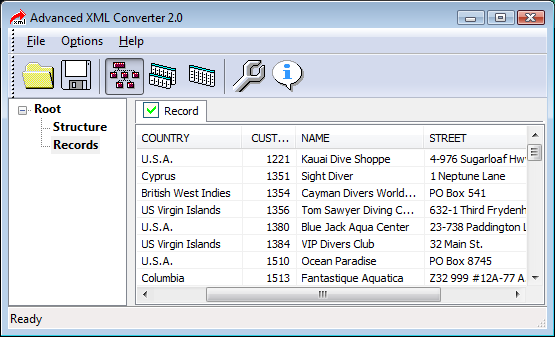
How Does It Work?Advanced XML Converter does XML conversion in three steps. The first step is to open XML source. Once selected, the program parses the XML file, groups tags by name and displays XML structure, as well as content for you to preview. This helps you to see structure and records of XML and select the fields you want to see in the output file after conversion. Step two is to select the conversion mode from several available. Each mode has its own settings to customize. The third step is when the program saves the output file. Get Output You WantAs flexible and user-oriented as Advanced XML Converter, there is another thing that users like about XML conversion. This is an ability to set up custom export parameters for an output file. For example, you can set HTML table styles, CSV delimiters, fields, tables to be exported, as well as many other parameters. Advanced XML Converter vs. ScriptingWriting XML transformations or XSL stylesheets typically means wasting hours and, sometimes, even days. Rather than putting efforts and time into inventing the wheel, Advanced XML Converter users enjoy a fully automated XML conversion process, turning a hard job into a relaxing fun ride. Save Money on Buying Database Creation PackagesDatabase creation packages are costly these days. Advanced XML Converter is an affordable approach to XML conversion. Priced at only $49 for a single user, the program will let you convert XML to HTML, CSV, DBF, XLS and SQL without the need to buy several database packages separately. There are also multi-user licenses that will cost considerably less than the purchase of several personal licenses. What's more, users with specific conversion needs can buy a narrow license for $24 to convert XML only to one format: HTML, CSV, or XLS. Convert XML in Batch ModeUsing Advanced XML Converter, you can convert more than one XML file in the batch mode. Just select the folder with files for XML conversion and begin the process. The program converts files one by one in the completely unattended mode, even when you are away, being busy with other things. XML Viewing ToolAdvanced XML Converter can be used as a default tool to open XML files. You can open XML, view file structure and records, rearrange the order of fields and hide some fields for convenient viewing. |
||||||||||||

Copyright © HiBase Group, 2002-2017 | Privacy Policy | ||||||||||||||